
If you’ve been chatting with ChatGPT and suddenly hit a wall that says something like “too many concurrent requests,” you’re not alone. This happens more often than people expect, especially during busy hours or when someone has multiple tabs running at once. It can feel confusing the first time, mainly because nothing seems wrong on your end. You type a message, hit enter, and instead of a reply you get an error.
The good news is that this issue is fixable in most cases. Some fixes take ten seconds, others need a bit more digging depending on whether you’re using the free version, ChatGPT Plus, or the API. Let’s break down what’s actually happening and why.
What does chatgpt too many concurrent requests mean
In plain terms, a “concurrent request” is any message or API call that’s being processed by ChatGPT’s servers at the same moment as another one. So when the system says you have too many concurrent requests, it basically means more than one request tied to your account, API key, or even your network is trying to get a response at the exact same time, and the server has a limit on how many it will handle together.
Think of it like a single cashier at a small shop. One customer at a time gets served properly. If three people shout their order simultaneously, the cashier can’t process all three, so the system pauses one or more of them until the first is done. ChatGPT works in a similar fashion, just on a much larger scale with millions of users.
This isn’t the same as a “rate limit exceeded” message, even though people often mix the two up. A rate limit is about how many requests you send over a stretch of time, like per minute or per day. A concurrency limit is about how many requests are active at once, regardless of how spread out they are. You could send only five messages an hour and still trigger this error if two of them somehow overlap, say from two open tabs or a script running in the background.
Why this error appears while using ChatGPT

There are a handful of everyday situations that trigger this specific error, and most of them are things people don’t even realize they’re doing.
One common case is having ChatGPT open in multiple browser tabs or devices at the same time, especially if you’re logged into the same account on your laptop and phone and you send a prompt from both within seconds of each other. Another frequent trigger is browser extensions that auto-refresh pages or inject scripts, which can quietly fire off requests in the background without you noticing.
If you’re working with the API rather than the chat interface, this gets more technical. Developers sometimes build apps or scripts that send several calls to the same API key at once, maybe testing a chatbot with multiple simultaneous users, or running a loop that doesn’t wait for one response before sending the next. I’ve seen this happen a lot with beginner projects where someone forgets to add a queue system, so five test requests all hit the endpoint within the same second.
Shared networks can cause this too. Offices, schools, and co-working spaces where many people use ChatGPT through the same IP address sometimes see this error even when no single person is doing anything unusual. The platform doesn’t always distinguish cleanly between “one busy user” and “fifty people on one network,” so the limit can get tripped by the collective traffic.
Main reasons behind concurrent request limit issue
Breaking this down further, the root causes tend to fall into a few clear categories.
Account-level throttling is the most direct one. Free accounts generally have tighter concurrency allowances than paid plans, so if you’re on the free tier and sending requests quickly, possibly while also having ChatGPT open elsewhere, you’ll hit this ceiling faster than a Plus or Team subscriber would.
API key misuse is another big one, and it’s something I run into constantly when reviewing scripts for clients. If a single API key is shared across multiple applications, team members, or testing environments, all those processes count against the same concurrency pool. A developer running a local test while a deployed app is also live, both using the same key, is a textbook setup for this error.
Server-side load matters as well, and this part is outside your control. During peak hours, particularly evenings in US and European time zones, OpenAI’s infrastructure handles a massive spike in simultaneous sessions. Even with no unusual behavior on your end, the platform can briefly tighten concurrency limits to keep things stable for everyone.
Lastly, automation tools and bots that aren’t built with proper request handling are a frequent culprit. Tools that loop through prompts without pausing between calls, or browser automation scripts that don’t respect response timing, can stack up several active requests in a short window, which is exactly the kind of pattern that triggers this message.
Is ChatGPT server overloaded when this error shows up
Sometimes yes, sometimes no. That’s the honest answer, and it’s worth separating the two because the fix is different depending on which one it is.
When OpenAI’s servers genuinely face heavy traffic, usually during peak hours or right after a major product update, the platform can struggle to keep up with demand across the board. You’ll usually notice signs beyond just your own chat: replies typing out slower than normal, the page lagging when you switch chats, or even other people mentioning the same issue on social media around the same time. In these cases the concurrent request error isn’t really about you at all. It’s a side effect of OpenAI managing traffic across millions of active sessions worldwide.
On the other hand, a lot of the time the error has nothing to do with server load and everything to do with how requests are being sent from your end. If you check OpenAI’s status page (status.openai.com) and everything shows green, with no reported outages or degraded performance, that’s a strong sign the issue is local. Maybe a tab you forgot about is still running, or a script is firing requests faster than it should.
A quick way to tell the difference is timing. Server overload tends to come in waves and affects many users at once, often clearing up within minutes. If the error keeps happening to you specifically while others seem fine, the problem is more likely sitting in your own setup.
How ChatGPT handles multiple requests at the same time

Behind the scenes, ChatGPT doesn’t process every single request the moment it arrives. Requests get placed into a queue, and the system works through them based on available computing capacity at that exact second. Each response you get involves real GPU processing power generating text token by token, and that processing isn’t unlimited even for a company the size of OpenAI.
To keep things fair and stable, the system applies limits at multiple levels. There’s a per-account concurrency cap, meaning how many requests linked to your login can be active simultaneously. For API users, there’s also a per-key limit, which is separate from account-level chat usage. These caps exist so one heavy user or one misbehaving script doesn’t slow things down for everyone else sharing the same infrastructure.
This is similar to how a restaurant kitchen runs during a rush. Orders come in, get queued, and the kitchen processes them in a sequence based on how many cooks and stations are free. If ten orders for the same complicated dish land at once, some customers wait longer even if their order was simple. ChatGPT’s backend works on a comparable principle, just automated and adjusted in real time based on server load, model type, and account tier.
This is also why GPT-4 and similar advanced models tend to hit concurrency limits faster than lighter models. They require more processing per request, so the system can handle fewer of them running in parallel before things back up.
Simple ways to fix chatgpt too many concurrent requests error
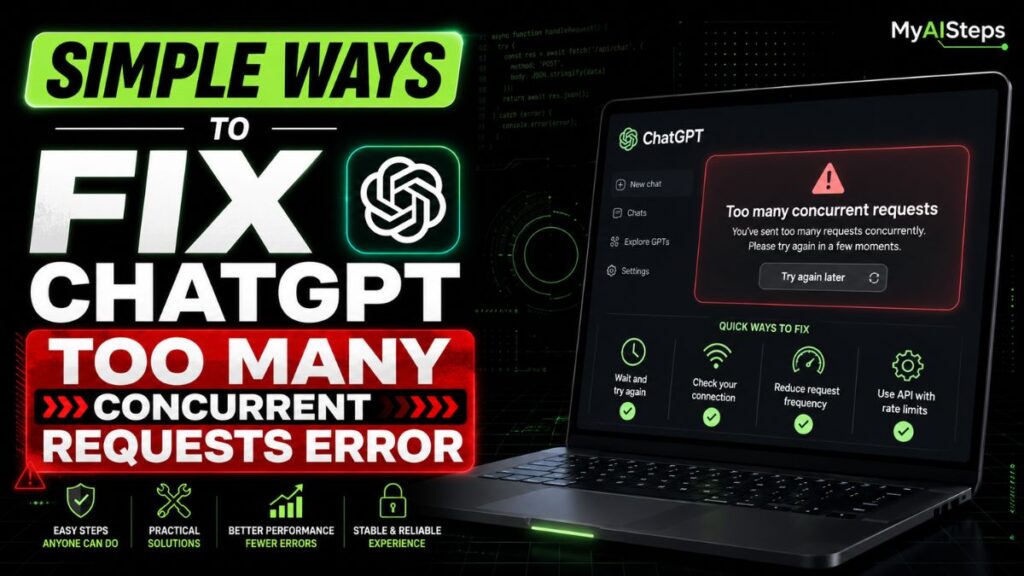
Most fixes here are quick, and you don’t need technical skills for the first few.
Start by closing any extra tabs or devices where ChatGPT might be open. It sounds obvious, but I’ve personally lost track of an open tab on my phone while testing something on a laptop, and that one forgotten tab was enough to cause this error. Logging out and back in also clears any stuck sessions that might still be counted as active.
If you’re on a shared network, like office wifi, switching to mobile data briefly can confirm whether the issue is network-related. Disabling browser extensions, especially ones that refresh pages automatically or inject scripts, is another easy step that solves this more often than people expect.
For developers working with the API, the fix usually involves code rather than settings. Adding a short delay between requests, using a queue system instead of firing calls all at once, and implementing retry logic with exponential backoff (waiting a bit longer each time before retrying) handles this cleanly. Tools like Python’s asyncio.Semaphore or simple rate-limiting libraries can cap how many requests run in parallel, which prevents the error from triggering in the first place.
If none of that helps, waiting two or three minutes before trying again usually resolves temporary server-side congestion. And checking the OpenAI status page first can save you time troubleshooting something that isn’t actually on your end.
Why this error happens more on free accounts
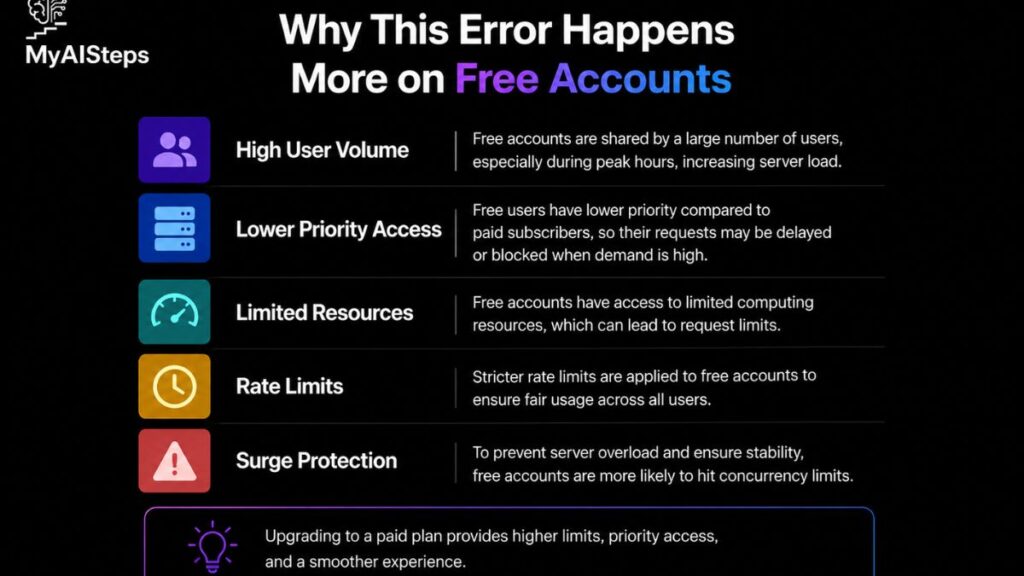
Free ChatGPT accounts run on a smaller slice of available capacity compared to paid tiers, and that’s by design rather than a flaw. OpenAI needs to balance access for a massive number of free users against the resources that paid subscribers are, in part, paying to reserve.
In practice, this means free accounts have a lower concurrency allowance. If you’re using the free version during a busy period, like weekday evenings when usage spikes globally, you’re more likely to be among the first to see this error compared to a ChatGPT Plus or Team user, since paid plans get priority access during high-traffic windows.
There’s also a model factor. Free accounts are often routed to lighter, faster models for cost reasons, but during periods of heavy demand, even that capacity gets stretched thin across millions of free users at once. Paid tiers, by comparison, draw from a separate and generally larger pool of server capacity, which is part of why Plus and Team subscribers report this error far less often.
None of this means a free account is unreliable for everyday use. It just means the margin for error is smaller, so things like extra open tabs or background scripts are more likely to push you over the limit than they would on a paid plan with more breathing room.
Difference between rate limit and concurrent request error

People mix these two up constantly, so it’s worth laying them out side by side.
A rate limit controls volume over time. OpenAI might allow, say, a certain number of requests per minute or a certain number of tokens per day depending on your plan. If you go over that count, even with requests sent one after another with gaps in between, you’ll get a rate limit error. It’s a timing rule, not a “how many at once” rule.
A concurrent request error is about simultaneity, not volume. You could be well under your daily or per-minute allowance and still get this error if two or more requests happen to be active in the same instant. Sending one message every thirty seconds is unlikely to trigger it. Sending three messages within the same second, from three open tabs, very likely will.
Here’s a simple way to remember the difference: rate limits ask “how many over time,” concurrency limits ask “how many right now.” Developers working with the API usually run into rate limit errors when scaling up usage gradually, while concurrency errors tend to show up suddenly when something fires requests in parallel without spacing them out. Both return different error messages too, so checking the exact wording you received is the fastest way to know which one you’re actually dealing with.
How to prevent this error in future usage

Prevention here is mostly about habits, not some technical trick.
If you’re a regular ChatGPT user, the simplest habit is sticking to one active tab or device at a time. It’s tempting to keep ChatGPT open everywhere, in a browser tab, a phone app, maybe a desktop app too, but each of those counts toward the same account limit if you happen to send messages close together. Closing tabs you’re not actively using clears this up without any real effort.
For anyone building with the API, prevention means designing requests properly from the start rather than fixing them after errors show up. Using a request queue so calls go out one at a time, or in small controlled batches, avoids overlapping calls entirely. Setting a reasonable timeout and retry strategy also helps, so if a request does fail, your script waits a moment instead of immediately firing another one on top of it.
It also helps to monitor your usage through the OpenAI dashboard if you’re on a paid or API plan. Keeping an eye on request patterns lets you spot a script that’s misbehaving before it becomes a recurring problem. I’ve caught more than one runaway loop this way, where a script kept retrying instantly after every failure instead of pausing, which just made the original error worse.
Best practices to avoid request limits in ChatGPT

A few small practices go a long way in keeping things running smoothly.
Space out your requests naturally. There’s rarely a real need to send several prompts back to back within the same second, whether you’re chatting manually or automating something. Giving even a one or two second gap between API calls reduces the chance of hitting a concurrency wall.
Stick to one session per account at a time when possible. If you’re working across a team, use separate API keys for separate projects rather than sharing one key across multiple apps or developers. This keeps usage easier to track and prevents one project’s traffic from affecting another’s.
For heavier or business use, upgrading from a free account to ChatGPT Plus, Team, or an API plan with higher limits removes a lot of this friction altogether. Paid tiers come with noticeably higher concurrency allowances, so the kind of everyday usage that trips up free accounts rarely becomes an issue.
Lastly, build in basic error handling if you’re coding against the API. A short wait-and-retry approach, rather than instantly resending a failed request, respects the server’s limits and avoids creating the exact pile-up that causes this error in the first place.
The “too many concurrent requests” error usually comes down to timing rather than anything broken. Whether it’s a forgotten tab, a script firing requests too quickly, or genuine server load during a busy hour, the cause is almost always identifiable once you know what to look for. Most regular users fix it within a minute just by closing extra sessions or waiting a short while.
Developers and businesses dealing with this more frequently benefit from a bit of planning, like spacing out API calls and using separate keys per project. Once those habits are in place, this error becomes rare rather than routine.
Conclusion
The “ChatGPT too many concurrent requests” error usually appears when too many actions are sent at the same time.
It can happen because of extra tabs, repeated prompts, browser issues, or temporary server load.
Most of the time, waiting a few minutes, refreshing the page, or closing extra sessions can fix it.
The best approach is to use ChatGPT one request at a time so the system can respond smoothly.
If the problem continues, clear your browser cache, log in again, or try another device.
This error is usually temporary, not a serious issue with your account.
Once you understand the causes and fixes, it becomes easy to handle without confusion.
Frequently Asked Questions
Does the concurrent request error mean my account is banned or restricted?
No, it’s a temporary traffic limit, not a ban or account restriction.
Will upgrading to ChatGPT Plus completely stop this error?
It significantly reduces it by raising your concurrency limit, though it can’t guarantee it never happens.
Can using ChatGPT on two devices at once cause this error?
Yes, sending prompts from two devices within seconds of each other can trigger it.
Is this error the same as ChatGPT being down?
Not usually, since it’s most often tied to your account or network rather than a full outage.
How long should I wait before trying again after this error?
Waiting one to three minutes is usually enough for the limit to reset.