

A few years ago, most people had never heard of ChatGPT. Today, it’s being used by students to study, marketers to brainstorm content ideas, software developers to troubleshoot code, and business owners to save hours of work every week.
Yet despite its popularity, many beginners still have the same questions:
- What exactly is ChatGPT?
- Does it think like a human?
- Does it search Google for answers?
- Why does it sometimes make mistakes?
- How does it generate responses so quickly?
If you’ve ever wondered what’s happening behind the screen when you chat with AI, this guide will walk you through the basics without drowning you in technical jargon.
Let’s start with the fundamentals.
What Is ChatGPT and Why Is It So Popular?
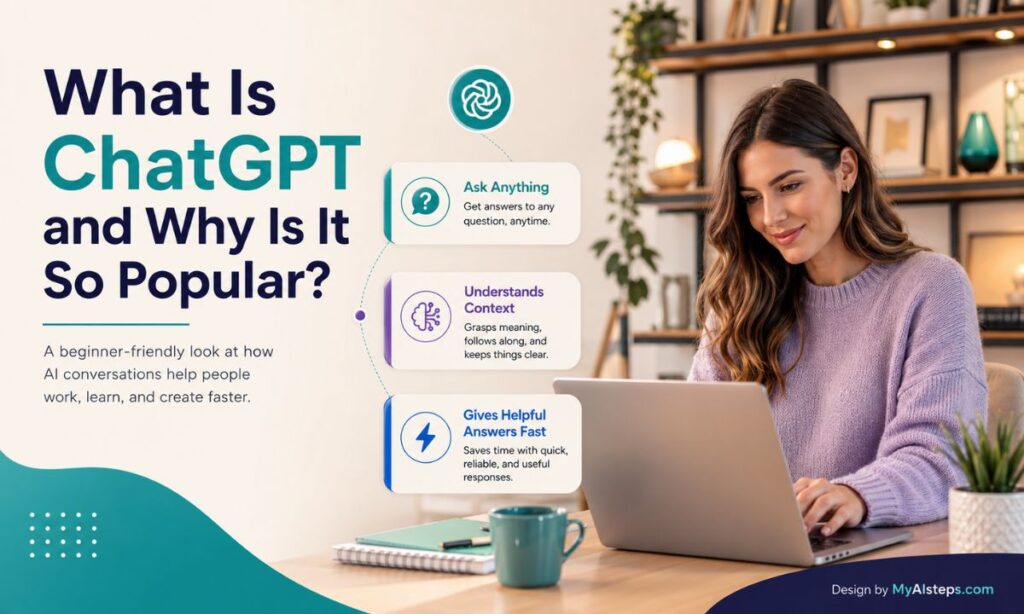
At its simplest, ChatGPT is an AI chatbot that can understand questions written in everyday language and generate human-like responses.
Instead of forcing users to learn commands or complicated software, ChatGPT works through conversation. You ask a question, give instructions, or describe a problem, and the system responds in plain English.
That sounds simple, but the impact has been enormous.
Many first-time users expect ChatGPT to be nothing more than an advanced search engine. Then they realize it can:
- Draft emails
- Summarize long documents
- Explain difficult topics
- Generate content ideas
- Create study notes
- Help with coding
- Translate text
- Plan trips and schedules
The appeal isn’t just that it provides information. It’s that it adapts to follow-up questions.
For example, if you ask Google, “How do I start a small business?” you’ll likely receive a list of links.
If you ask ChatGPT the same question, you can continue the conversation:
“Can you explain that in simpler terms?”
“What if my budget is only $5,000?”
“Can you create a checklist for me?”
That’s where conversational AI feels different.
ChatGPT was developed by OpenAI and is powered by a type of artificial intelligence known as a Large Language Model (LLM). We’ll cover what that means shortly.
One reason for its explosive growth is accessibility. You don’t need programming skills, technical knowledge, or specialized training to use it. If you can type a question, you can use ChatGPT.
The Technology Behind ChatGPT Explained in Simple Terms
Most people imagine AI as something futuristic and mysterious.
The reality is less dramatic—but still impressive.
At its core, ChatGPT is built using machine learning, a branch of artificial intelligence that allows systems to learn patterns from data rather than following fixed rules.
Think about how a child learns language.
A child doesn’t start by memorizing grammar textbooks. Instead, they hear conversations, read books, watch people communicate, and gradually recognize patterns.
ChatGPT learned in a somewhat similar way, although on a vastly larger scale.
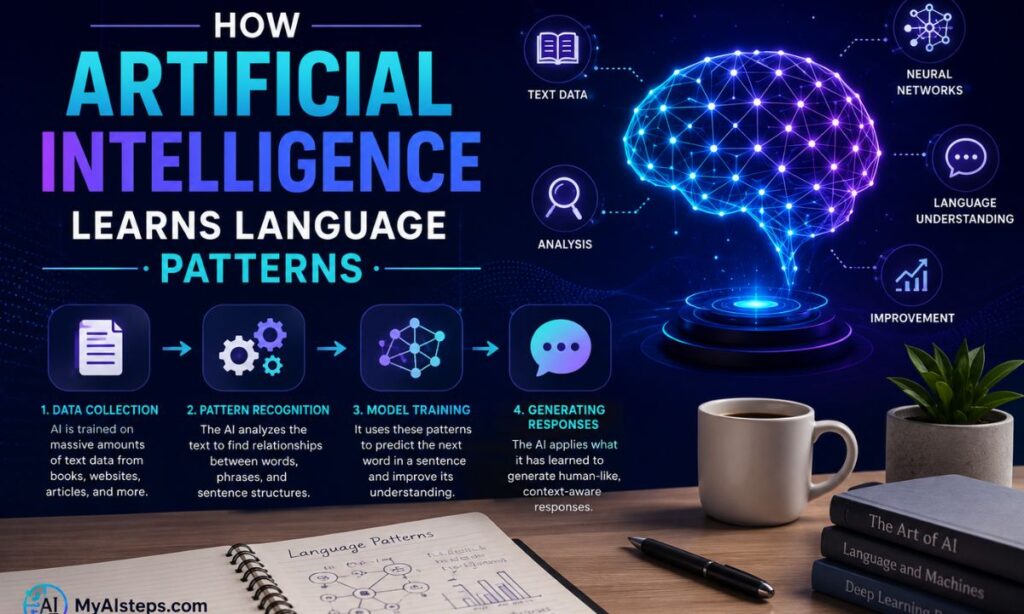
Before it could answer questions, the system was trained using enormous amounts of text. During training, it analyzed how words, phrases, and ideas tend to appear together.
Over time, it became increasingly good at predicting what comes next in a sequence of words.
That’s an important point because many beginners assume ChatGPT is constantly “thinking” through answers like a person would.
It isn’t.
In practice, it’s predicting the most likely and useful next word based on patterns it learned during training.
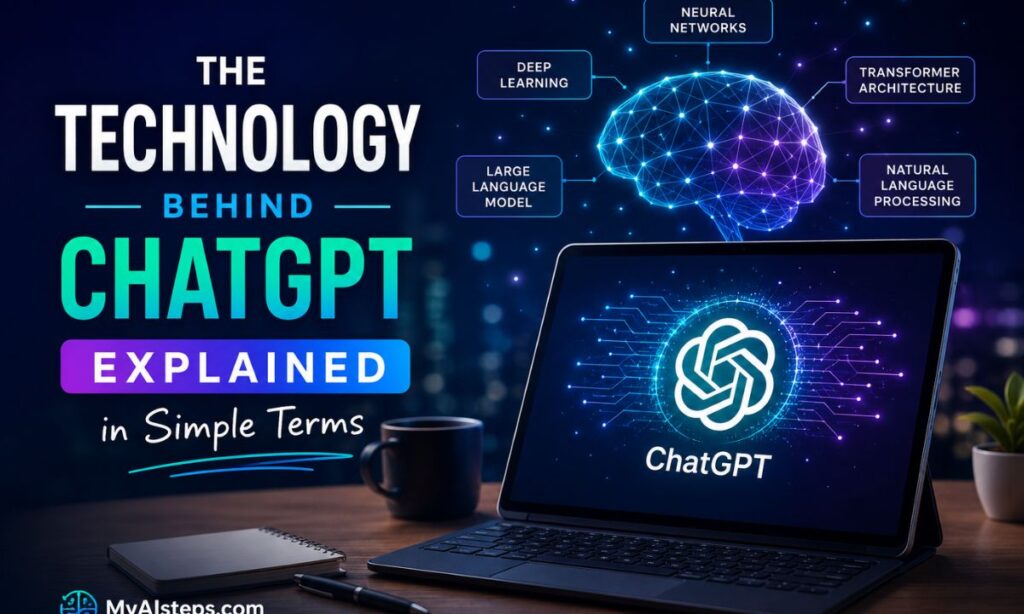
The technology behind this process involves:
- Machine learning
- Neural networks
- Natural Language Processing (NLP)
- Large Language Models
You don’t need to master any of these concepts to use ChatGPT effectively.
In fact, most people use AI tools every day without understanding the technical details behind them. GPS navigation, recommendation systems on streaming platforms, and spam filters all rely on forms of artificial intelligence.
ChatGPT simply brings AI into a conversational format that feels more natural.
How Artificial Intelligence Learns Language Patterns
One of the biggest misconceptions about ChatGPT is that it stores information the same way humans do.
It doesn’t.
When you remember your hometown, a favorite movie, or your first job, those memories come from personal experience.
ChatGPT has no personal experiences.
Instead, it learns patterns.
Imagine reading millions of books, articles, websites, forums, and conversations. After enough exposure, you would start noticing relationships between words and ideas.
For example:
- “Texas” often appears near “Austin.”
- “Earth” often appears near “planet.”
- “Photosynthesis” often appears near “plants.”
AI training works in a similar way, except at a scale that humans simply can’t match.
Rather than memorizing every sentence, the system learns probabilities and relationships.
When someone asks:
“What is the capital of Texas?”
ChatGPT doesn’t search a database in the way many people imagine.
Instead, it generates a response based on patterns learned during training, where “Austin” consistently appeared alongside “Texas” and “capital.”
This distinction matters because it explains why ChatGPT can occasionally make mistakes.
The model is excellent at recognizing patterns.
Pattern recognition, however, is not the same thing as understanding.
That’s why AI can sometimes provide an answer that sounds convincing but contains errors.
A useful rule for beginners is this:
ChatGPT predicts language. It does not possess human knowledge or awareness.
Understanding that single idea makes the strengths and weaknesses of AI much easier to understand.
Understanding Large Language Models (LLMs) Without the Jargon
If you’ve spent any time reading about AI, you’ve probably encountered the phrase “Large Language Model” or “LLM.”
The name sounds complicated, but the concept is surprisingly straightforward.
Let’s break it apart.
Language
The model works with human language—words, sentences, questions, and conversations.
Large
The “large” part refers to scale.
Modern AI models are trained using massive amounts of text data. The volume is so large that traditional comparisons don’t really do it justice.
The size allows the system to recognize subtle patterns, context, tone, and relationships that smaller models often miss.
Model
A model is essentially a system trained to identify patterns and generate predictions.
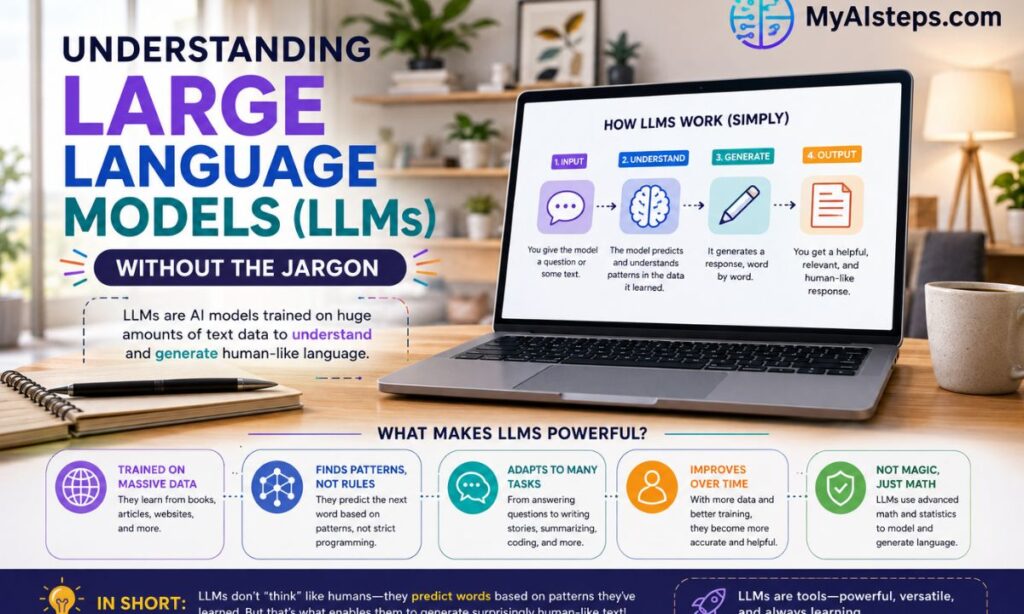
Put together, a Large Language Model is an AI system trained on vast amounts of text that can understand and generate language.
One thing that surprises many beginners is how versatile these models are.
The same underlying technology can:
- Answer questions
- Summarize reports
- Draft blog posts
- Translate languages
- Brainstorm ideas
- Explain technical concepts
- Assist with research
That’s why ChatGPT can switch from helping someone write an email to explaining a science concept within the same conversation.
A useful analogy is to think of an LLM as an extremely advanced prediction engine.
Its job isn’t to search for answers.
Its job is to generate the response most likely to fit the context of the conversation.
That’s the engine powering everything you see when interacting with ChatGPT.
How ChatGPT Processes Your Questions and Generates Answers
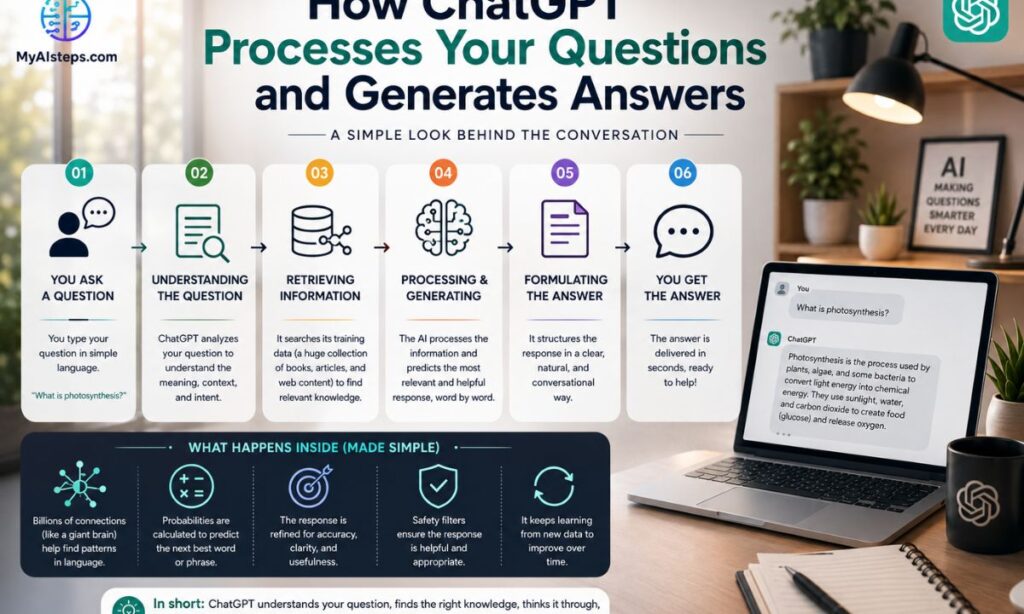
The moment you submit a prompt, a series of processes begin behind the scenes.
While it feels instant, several steps occur in rapid succession.
Here’s a simplified version:
| What Happens | |
| 1 | ChatGPT receives your prompt |
| 2 | The system analyzes the words and context |
| 3 | It predicts the most likely response |
| 4 | The answer is generated one token at a time |
| 5 | The completed response appears on your screen |
A common beginner question is:
“Does ChatGPT search Google before answering?”
Usually, no.
Many people assume AI works like a search engine.
That’s not how standard ChatGPT responses are generated.
Instead, the model relies on patterns learned during training and the context available in the conversation.
Consider this prompt:
“How do I start a small business?”
ChatGPT analyzes the request, identifies key concepts such as business planning, legal requirements, financing, and operations, and begins generating a response.
One word leads to the next.
Then the next.
Then the next.
The process happens incredibly fast, which is why responses appear almost immediately.
Interestingly, this is also why two users can ask nearly identical questions and receive slightly different answers.
The AI isn’t retrieving a fixed response from a database. It’s generating a fresh response each time.
That flexibility is one of ChatGPT’s greatest strengths.
It’s also one reason why users should occasionally fact-check important information—a topic we’ll cover later in this guide.
What Happens Behind the Scenes When You Start a Chat?
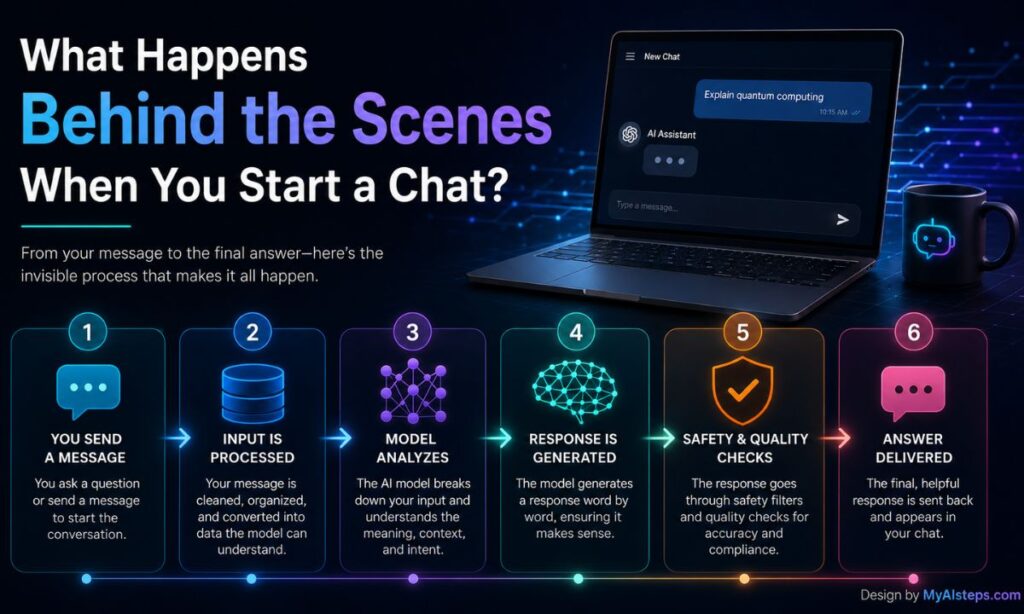
Most users never think about what happens after they hit the send button.
You type a question. A few seconds later, an answer appears.
Simple.
Behind the scenes, however, there’s a lot more going on.
A useful way to think about it is ordering food at a busy restaurant.
You only see two things:
- Placing your order
- Receiving your meal
You don’t see the kitchen staff, ingredients, preparation, timing, or coordination happening in the background.
AI systems work similarly.
When you send a message, the request travels to powerful servers located in data centers. These systems process enormous amounts of information simultaneously, allowing millions of people to use AI tools at the same time.
The system then:
- Receives your prompt
- Analyzes its meaning
- Considers conversation context
- Predicts an appropriate response
- Generates the answer
- Sends it back to your device
All of this typically happens in just a few seconds.
One thing that surprises beginners is that ChatGPT isn’t sitting on your laptop or phone. Most of the heavy lifting happens through cloud computing infrastructure.
That’s one reason why AI tools have become so widely accessible. Users don’t need specialized hardware to benefit from advanced AI technology.
How ChatGPT Uses Context to Keep Conversations Relevant
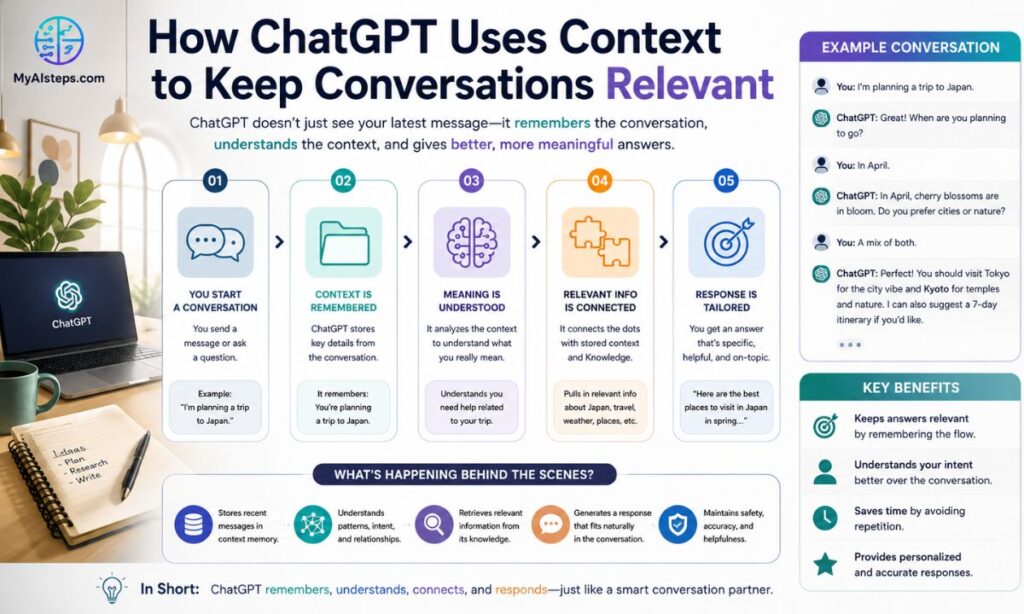
Imagine asking someone:
“What’s the best time to visit New York?”
A few minutes later you ask:
“What neighborhoods should I stay in?”
A human immediately understands you’re still talking about New York.
ChatGPT tries to do the same thing.
This ability is called context awareness.
Instead of treating every prompt as completely independent, the model uses previous messages to understand what you’re discussing.
That context creates more natural conversations.
For example:
User: I’m planning a trip to New York.
User: What are the best attractions?
User: Which hotels would you recommend?
ChatGPT understands the hotel question relates to New York, even though the city wasn’t mentioned again.
This is one reason conversational AI feels very different from traditional search engines.
A Common Beginner Mistake
Many users start a conversation and then abruptly change topics without saying so.
For example:
- First question: investing
- Second question: vacation planning
- Third question: fitness
Without clear transitions, context can become confusing.
A simple fix is to tell ChatGPT when you’re changing subjects.
Something like:
“Let’s switch topics.”
or
“Now I’d like help with fitness.”
Small adjustments like this often improve response quality significantly.
The Reality of Context Limits
Despite the improvements in modern AI, context isn’t perfect.
Long conversations can sometimes lead to:
- Forgotten details
- Inconsistent answers
- Incorrect assumptions
- Mixed topics
That’s normal.
The more important the task, the more helpful it is to provide fresh context rather than assuming the AI remembers everything perfectly.
What ChatGPT Can Do for Everyday Users and Businesses

One reason ChatGPT became popular so quickly is that its use cases are surprisingly broad.
Many people sign up expecting a chatbot.
They end up discovering a productivity tool.
For Everyday Users
People commonly use ChatGPT for:
- Learning new topics
- Writing emails
- Planning vacations
- Studying for exams
- Creating meal plans
- Brainstorming ideas
- Improving resumes
- Practicing interviews
One practical example:
A student struggling with a difficult economics chapter can ask ChatGPT to explain it at a beginner level.
Then ask:
“Explain it like I’m 15.”
Then:
“Give me three examples.”
That kind of back-and-forth learning experience is difficult to replicate with traditional search results.
For Businesses
Businesses are using AI in ways that would have seemed unrealistic just a few years ago.
Common applications include:
- Customer support assistance
- Content creation
- Marketing brainstorming
- Meeting summaries
- Internal documentation
- Data organization
- Research assistance
Many companies don’t use AI to replace employees.
Instead, they use it to reduce repetitive work.
For example, a marketing manager might spend 30 minutes creating a first draft instead of three hours starting from scratch.
What ChatGPT Does Well vs Poorly
| Performs Well | Struggles With |
| Drafting content | Real-time news |
| Summarizing information | Perfect accuracy |
| Brainstorming ideas | Human judgment |
| Explaining concepts | Complex emotional situations |
| Organizing information | Specialized professional advice |
| Language tasks | Understanding every nuance |
Understanding both sides creates realistic expectations.
That’s important because AI works best when treated as a tool rather than a replacement for expertise.
The Limitations of ChatGPT Every Beginner Should Know

One of the biggest mistakes people make is assuming that because ChatGPT sounds confident, it must be correct.
Unfortunately, that’s not always true.
AI can be wrong.
And sometimes it can be wrong in a very convincing way.
Limitation #1: Hallucinations
A term you’ll often hear in AI discussions is “hallucination.”
This occurs when ChatGPT generates information that sounds believable but isn’t actually true.
For example, it might:
- Invent a statistic
- Create a fake source
- Misstate a fact
- Confuse two similar topics
This isn’t intentional deception.
It’s simply a side effect of predictive text generation.
Limitation #2: Knowledge Gaps
Many beginners think ChatGPT knows everything.
It doesn’t.
Its knowledge depends on:
- Training data
- Available tools
- System updates
As a result, some information may be outdated or incomplete.
Limitation #3: Prompt Quality Matters
A vague prompt usually produces a vague answer.
Compare these:
❌ “Tell me about marketing.”
✅ “Explain digital marketing strategies for a local bakery with a $500 monthly budget.”
The second prompt gives the AI far more useful context.
A Good Rule to Remember
Use ChatGPT as:
- A research assistant
- A brainstorming partner
- A writing helper
- A productivity tool
Do not use it as your only source for:
- Medical advice
- Legal advice
- Financial decisions
- Safety-critical information
Critical thinking still matters.
Is ChatGPT Accurate, Safe, and Reliable to Use?

This question comes up almost every time someone new discovers AI.
The honest answer?
Usually yes—but with caveats.
Accuracy
ChatGPT performs remarkably well on many everyday tasks.
However, accuracy varies depending on:
- Topic complexity
- Prompt quality
- Availability of information
- Context provided
The safest approach is simple:
Trust, but verify.
For routine tasks, AI is often accurate enough.
For important decisions, verification is essential.
Safety
Modern AI systems include safeguards designed to reduce harmful content and misuse.
However, users should still avoid sharing:
- Passwords
- Banking information
- Sensitive personal data
- Confidential business information
A good rule is to avoid sharing anything online that you wouldn’t want exposed publicly.
Reliability
For tasks like:
- Writing
- Summarization
- Brainstorming
- Learning concepts
ChatGPT is generally reliable.
For highly specialized fields, professional expertise remains important.
The strongest users combine AI assistance with human judgment rather than relying entirely on either one.
The Future of ChatGPT and AI-Powered Communication Tools

It’s easy to forget how new this technology actually is.
Many of the capabilities people take for granted today would have sounded unrealistic just a decade ago.
The next few years will likely bring improvements in several areas:
- Better accuracy
- Longer memory
- More personalization
- Improved reasoning
- Better voice interaction
- Deeper integration with software tools
We’re already seeing AI assistants appear inside:
- Email platforms
- Search engines
- Office software
- Customer support systems
- Design applications
The bigger trend isn’t that AI is replacing everything.
It’s becoming part of everything.
At the same time, important discussions around privacy, transparency, bias, and responsible AI development will continue.
The technology will improve.
But so will expectations.
The people who benefit most won’t necessarily be the ones who know the most about AI.
They’ll be the ones who understand how to use it effectively.
Final Thoughts
Understanding how ChatGPT works doesn’t require a computer science degree.
At its core, the technology is built around a surprisingly simple idea: learning patterns from massive amounts of language and using those patterns to generate useful responses.
The result is a tool that can help people learn, create, organize, and solve problems faster than ever before.
It’s not perfect.
It makes mistakes.
It has limitations.
But when used thoughtfully, ChatGPT can become one of the most useful digital tools available today.
For beginners, that’s the most important thing to remember: AI works best when it’s treated as a helpful assistant—not as a substitute for human judgment.
Frequently Asked Questions
Is ChatGPT free to use?
ChatGPT offers both free and paid plans. The available features depend on the plan you choose.
Does ChatGPT search the internet?
Not always. Standard responses are generated from the model’s training and conversation context. Some versions can access web information when specific tools are enabled.
Can ChatGPT replace Google?
Not completely.
Google is designed to help users find information sources, while ChatGPT is designed to generate direct responses and assist with tasks. Many people use both together.
Is ChatGPT always accurate?
No.
While often helpful and surprisingly accurate, it can occasionally generate incorrect information. Important facts should always be verified.
What does GPT stand for?
GPT stands for Generative Pre-trained Transformer.
The name reflects how the model is trained and how it generates language.
Can ChatGPT learn from my conversation?
ChatGPT can use context within a conversation to generate better responses. Whether conversations are used for training depends on the platform’s settings and policies.